


Daily TSP
3.9542.00 Reviews
App Specs
- Version
- 7.0.0
- Updated On
- License
- Free
- Downloads
- 100,000+
- Developer
- Taza Technology, LLC
- Categories
- Finance
- Platform
- Android
Screenshots
 Analysis by AppCompare
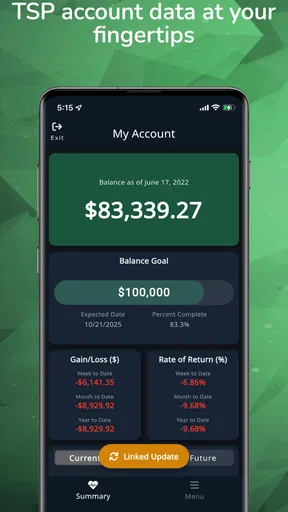
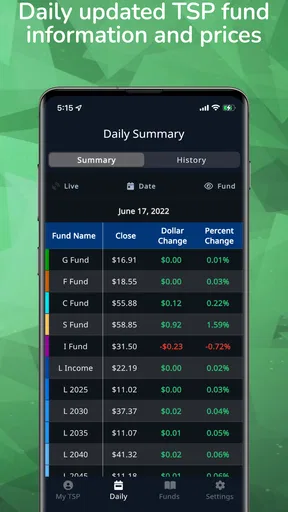
I use Daily TSP for a much narrower job than a general planner: keeping an eye on Thrift Savings Plan fund share prices and my account balance. That focus is the point. Rather than asking me to organize meetings, errands, and household reminders, it is built around a specific retirement account and the daily information that can help me follow it. If you have a TSP account and want a convenient way to check how it is doing, this is the kind of small, focused finance app that can fit into a regular routine.
Following TSP prices without turning it into a project
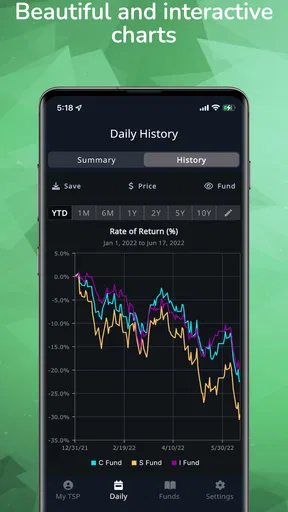
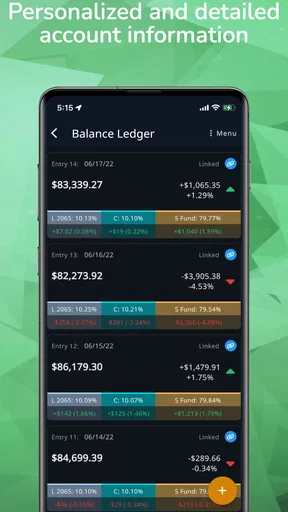
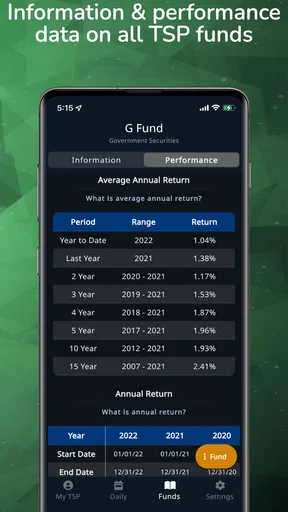
The useful idea is not simply seeing a balance on a phone. It is being able to check fund prices and account value together, then use charts to put a daily change in context. In practice, that makes a quick visit more informative than glancing at a single number: I can look at what the funds are doing and whether the account movement seems connected to that activity. The charts are interactive, so the experience is intended for looking around rather than treating the screen as a static statement.
I would still think of it as a tracking companion, not a replacement for the official account tools or a source of investment advice. A chart can help me notice movement and stay engaged, but it cannot tell me whether a fund choice suits my retirement plan. That distinction matters with any finance app: an easy-to-read visual can encourage useful attention, yet it can also tempt people to react to ordinary daily ups and downs. I find the best use is checking with a question in mind, not refreshing repeatedly in search of a reason to trade.
What the charts are good for
Daily prices are easier to interpret when I can compare them with the shape of a chart rather than fixating on one day. An interactive view is most useful when I want to explore a trend, check whether a change looks isolated, or compare the movement I am seeing with the broader account picture. That is a more grounded habit than letting one prominent balance figure dictate my mood. It also gives a TSP-focused user a reason to open the app even when they are not planning to make a change.
There is a trade-off, though. A chart can make frequent checking feel productive even when it does not change a long-term decision. I would use the view to understand, not to predict. For someone investing for retirement, the practical benefit is a clearer snapshot of activity; the risk is giving short-term movement more importance than it deserves. If daily market changes make you anxious, setting a limited check-in routine is more sensible than keeping the app close at hand all day.
A routine that makes the information useful
A realistic use might be checking the app at the end of a workweek, when you have a quiet moment to review fund prices and your balance together. If the account looks different from the last time you checked, the chart can help you ask a better question: is this part of a broader movement, or am I reacting to a single update? That simple pause is valuable because it replaces a snap judgment with a little context. It does not require a complicated spreadsheet or a long finance session.
I would also avoid treating the app as the only place to keep track of retirement decisions. For example, I might use it for a quick visual check during the week, but turn to official account information when I need to verify details or take an account action. That division of labor keeps a convenient tracker in its lane. It is a practical workflow for someone who wants awareness without confusing monitoring with account management.
Worth Reading Before You Choose

EA SPORTS FC Mobile 26 Is a Bigger Football Game, but It Takes Time

Flipboard Shows What News Apps Must Do Beyond the Feed

Switching to Android Auto Means Rethinking Your Driving Routine

Google Calendar Makes a Crowded Week Easier to Manage

Ludo King Makes the Most of the Minutes Between Plans

Baby Panda World Brings Quick Play to Modern Phones, but Its Game Library Feels Busy
How it compares with general finance tools
Most budgeting apps are designed to help organize spending, categorize transactions, or watch cash flow. A broad investment portfolio app may bring together several types of accounts and holdings. Daily TSP has a different appeal: its subject is the TSP, and its main value is the combination of fund share prices, account balance tracking, and charts. If that is the information you are looking for, a focused tool can be quicker to understand than a financial dashboard crowded with unrelated accounts and features.
The narrow focus also means it is not the right fit for every financial routine. If you want one app to manage a household budget, track bank accounts, and monitor investments across multiple providers, a more general finance app is likely a better starting point. If you mainly want official account access and prefer not to use a separate tracker, the official TSP channel may be enough. I see this app as a useful middle ground for people who want an at-a-glance TSP view, not as a universal personal-finance hub.
Who benefits, and who may prefer another approach
Daily TSP is most relevant if you already have a TSP account and genuinely want to follow fund prices and your balance from a mobile device. It may suit someone who checks their retirement savings periodically, wants a visual view of daily movement, or is learning to connect fund performance with account changes. The app is free to download, and its finance focus is clear. Its audience is much more specific than the broad category label might suggest.
I would skip it if you do not use the TSP, if you want a full budgeting system, or if checking daily prices would encourage you to make impulsive decisions. It is also worth considering whether a second account-related app fits your personal comfort level. Before relying on any tracker, I would keep sensitive account habits sensible, use official channels for important account actions, and avoid assuming that a convenient display replaces checking the underlying account when accuracy matters.
Practical expectations before installing
The app is developed by Taza Technology, LLC. It has an average rating of 3.9 from around 1.4 thousand ratings, with over 100 thousand installs, so it has found a substantial audience while not being universally loved. I would read that as a reason to try it against your own needs rather than expecting every user to have the same experience. The rating is only one signal; the more important question is whether its TSP tracking and chart-based approach match how you want to monitor retirement savings.
It is free, with in-app purchases ranging from $9.99 to $49.99 per item. I would check what an optional purchase covers before deciding whether it is worthwhile, and I would not assume that paying is necessary just to get value from the basic idea of tracking prices and balance. The content rating is Everyone. The app was released on October 16, 2019, and its current version is 6.6.0, with Android 7.0 as the minimum operating system requirement.
One useful habit is to decide in advance what you want a check-in to answer. For example, you could look at the current fund prices and account balance, notice the chart’s broader shape, and then close the app without making a decision based on a single day. That keeps the tool from turning into a market-watching loop. Another sensible habit is to compare what you see with the official account when you are preparing to make a consequential choice, rather than treating a tracking screen as the final authority.
There are also questions worth asking yourself before making this part of your routine. Do you want a quick view of TSP activity, or are you looking for a place to change investments and manage every aspect of the account? Would charts help you understand your savings, or would they make you check too often? Are you comfortable using a separate tracker for routine monitoring while relying on official account resources for important details? Your answers are more useful than a generic promise of convenience, because they determine whether a focused app will actually make your financial routine calmer.
A focused tool, not a retirement plan
My overall view is that this app makes sense when its specific purpose matches a real habit: checking TSP fund prices and account balance with enough visual context to follow what is happening. The charts can make routine monitoring more thoughtful, particularly for people who want to notice patterns without assembling their own tracking process. But the same immediacy can be a drawback for anyone prone to overreacting to daily movement. I would use it as a window onto activity, not as a reason to trade or as a substitute for personal financial judgment.
If that distinction sounds right to you, Daily TSP is worth considering as a practical companion for staying aware of a TSP account. If you need budgeting, broad portfolio tracking, or a tool that guides investment choices, another option will serve you better. I like the focused premise, and I would recommend trying it only if you want this particular view of your retirement savings; its value comes from helping you check with context, not from promising to make financial decisions for you.
Getting Started with Daily TSP
First things first, downloading Daily TSP is a breeze. A quick search on the App Store or Google Play, and you’re ready to roll. Installation is smooth, and before you know it, the app is asking you to set up your preferences. It's intuitive from the get-go, with a user-friendly interface that feels as welcoming as a warm cup of tea on a cold day.
A Tour of the Features
Once you're in, Daily TSP offers a plethora of features designed to make your life easier. The homepage gives you a snapshot of your day, including tasks, appointments, and even a motivational quote to kickstart your morning. It’s like a personal cheerleader that also reminds you to pick up the dry cleaning.
Creating tasks is as simple as pie. Just tap the plus button, type your task, set a deadline, and boom, it’s in your calendar. There’s even an option to set priority levels, so you can manage your time like a pro. Trust me, your future self will thank you for this kind of organization.
Integrations and Syncing
Now, here’s where Daily TSP truly shines. The app syncs seamlessly with your calendar, email, and even your shopping list. It’s like a digital Swiss Army knife, integrating with various platforms to ensure you’re always in the loop. No more missed meetings or forgotten birthdays.
The syncing feature is quick and reliable. I tested it with both Google and Outlook calendars, and it worked like a charm. It’s refreshing to see how well it communicates across different platforms, making it a solid choice for professionals on the go.
Customization Galore
If you’re anything like me, you appreciate a bit of personalization. Daily TSP doesn’t disappoint in this department. You can choose color themes, notification styles, and even customize your task categories. It’s these little touches that make the app feel truly yours.
Additionally, the app offers a variety of widgets that you can add to your home screen. This means you can glance at your tasks without even opening the app. It’s a small touch, but one that makes a big difference in daily usability.
Performance and Usability
The app runs smoothly, with no noticeable lags or crashes during my testing. It’s like a well-oiled machine, responding swiftly to commands. Whether you’re scheduling a week's worth of tasks or just checking off your grocery list, Daily TSP handles it all with ease.
Moreover, the app’s design is sleek and modern. The layout is clean, ensuring that navigation feels effortless. Even if you’re not tech-savvy, you’ll find it easy to maneuver through its features.
Ending Thoughts
In conclusion, Daily TSP is a fantastic tool for anyone looking to boost productivity and manage their time efficiently. It’s packed with features yet remains easy to use, striking a perfect balance between functionality and simplicity. Whether you’re juggling work, family, or just trying to remember your gym schedule, this app has got you covered.
So, if you're ready to take charge of your daily grind, give Daily TSP a try. It might just become your new favorite app, helping you navigate through life one task at a time. Trust me, once you try it, you’ll wonder how you ever managed without it.
Pros
- User-friendly interface
- easy navigation.
- Customizable alerts for task reminders.
- Integrates with calendars seamlessly.
- Offers offline access to lists.
- Supports multiple languages for global use.
Cons
- Limited free version features.
- Occasional sync issues with cloud.
- No dark mode available yet.
- Ads can be intrusive at times.
- Lacks collaboration tools for teams.
FAQs for Daily TSP
What is Daily TSP and what features does it offer?
Daily TSP is a task scheduling and productivity app designed to help users organize their daily activities efficiently. It offers features such as customizable to-do lists, priority settings, reminders, and integration with calendar apps. The app aims to streamline your tasks, making it easier to manage personal and professional commitments.
Is Daily TSP available for both Android and iOS devices?
Yes, Daily TSP is available for both Android and iOS platforms. Users can download the app from the Google Play Store or the Apple App Store, ensuring compatibility with a wide range of devices. Regular updates are provided to enhance functionality and user experience on both operating systems.
Does Daily TSP offer any in-app purchases or subscription plans?
Daily TSP offers a free version with basic features, as well as premium options available through in-app purchases. The premium version provides advanced functionalities such as additional themes, priority task settings, and cloud synchronization. Subscription plans are available monthly or annually, offering flexibility based on user needs.
How user-friendly is the interface of Daily TSP?
Daily TSP boasts a clean and intuitive interface, making it easy for users of all technical levels to navigate. The app's design focuses on simplicity, ensuring that users can quickly add and organize tasks without unnecessary complexity. Tutorials and tips are available within the app to assist new users.
Does Daily TSP support collaboration with other users?
Currently, Daily TSP is designed for individual use and does not support direct collaboration features such as task sharing or team management. However, the developers have indicated potential future updates that may include collaborative tools, based on user feedback and demand.


